.gitignore
 Git Ignore (Source: wpforthewin.com)

What is .gitignore?
When sharing our code with others, there are often files or parts of the project that we don’t want to share. Or it could also be that the file is not suitable for tracking in Git (such as binary files)
Common examples are:
- Log files
- Databases
- Temporary files
- Hidden files
- Personal files
- etc
Git can determine which files or parts of a project should be ignored by Git using file .gitignore. Git will not track the files and folders specified in .gitignore but the .gitignore files themselves will be tracked by Git.
Rules when using .gitignore
Here are some general rules for pattern matching in .gitignore files:
| Pattern | Explanation | Example |
|---|---|---|
| name | All file names and folder names in any folder | /name.log or /name/file.txt or /lib/name.log |
| name/ | names ending with / will determine the pattern for folder. This matches all files and folders within the folder name |
/name/file.txt or /name/log/name.log does not match: /name.log |
| *.file | All files with the extension .file | /name.file or /lib/name.file |
To see more complete rules for .gitignore, you can see here
Example of .gitignore
To create a .gitignore file, go to the root of the Git repository and create the file:
Linux or Mac:
touch .gitignoreWindows:
type nul > .gitignoreNow open the file using the text editor and we can add two simple rules:
- Ignore any files with
.logextension - Ignore everything in any directory/folder named
temp
The following are the contents of the file .gitignore by implementing the rules above (the text after the # is a comment):
# Ignore ALL .log files
*.log

# Ignore ALL files in ANY directory named temp
temp/
Now all .log files and anything in the temp folder will be ignored by Git.
Note: Here, we are using a single
.gitignorethat applies to the entire repository.
It is also possible to have additional .gitignore files in subdirectories. This will only apply to files or folders in that directory, for example:
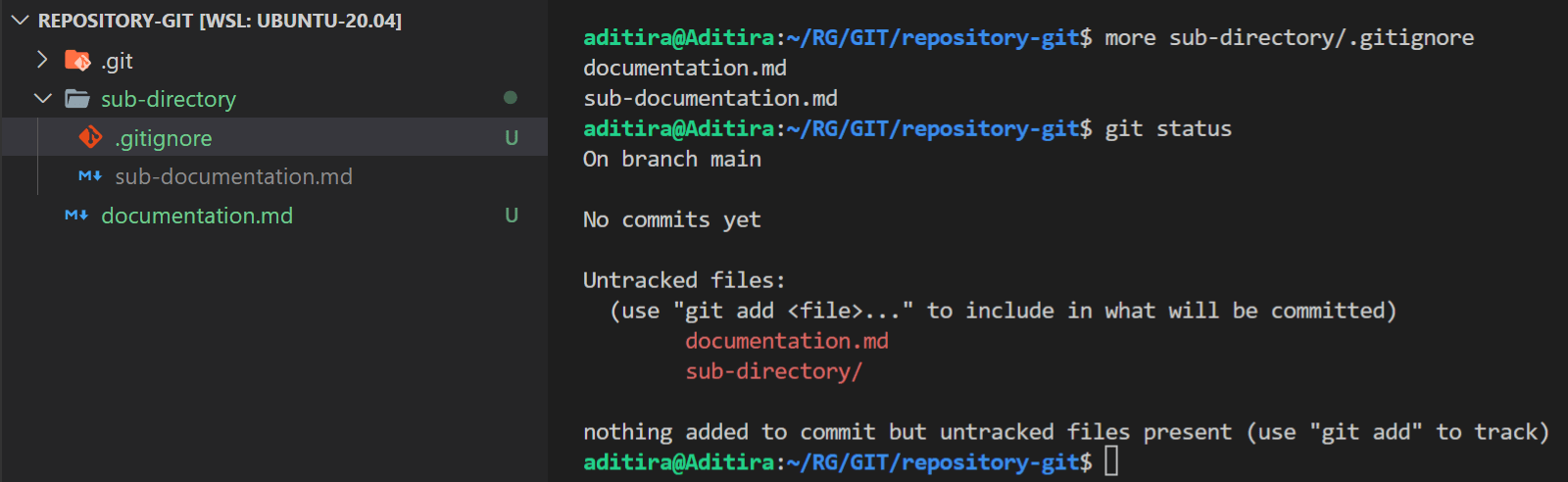
Explanation of the image above:
Note that
.gitignoreis in a sub-directory not in the root repository and it has a rule for Git to ignore filesdocumentation.mdandsub-documentation.md.When we do
git statuswe see that filedocumentation.mdand foldersub-directory/are still tracked. Remember that Git will track.gitignorefiles.But if you pay attention there is something strange, you can see that the file
documentation.mdis still being tracked by Git. This should not happen because we have already registered it in the.gitignorefile. Why could that happen?This proves that
.gitignorein sub-directory only affects the files inside it, while outside the folder it will have no effect.
For more details, you can watch the following video: